Date
Sept 2023 - May 2025

At Plane, I got to play for two sides- designing for the product and the people who'd eventually fall in love with it. From features to websites, I left a little bit of me everywhere.
Industry
Open Source, Saas
What did I do?
Product Design | Web Design | Marketing Design
What did I learn?
Marketing tricks and sharpened my PM instincts.
Active cycles
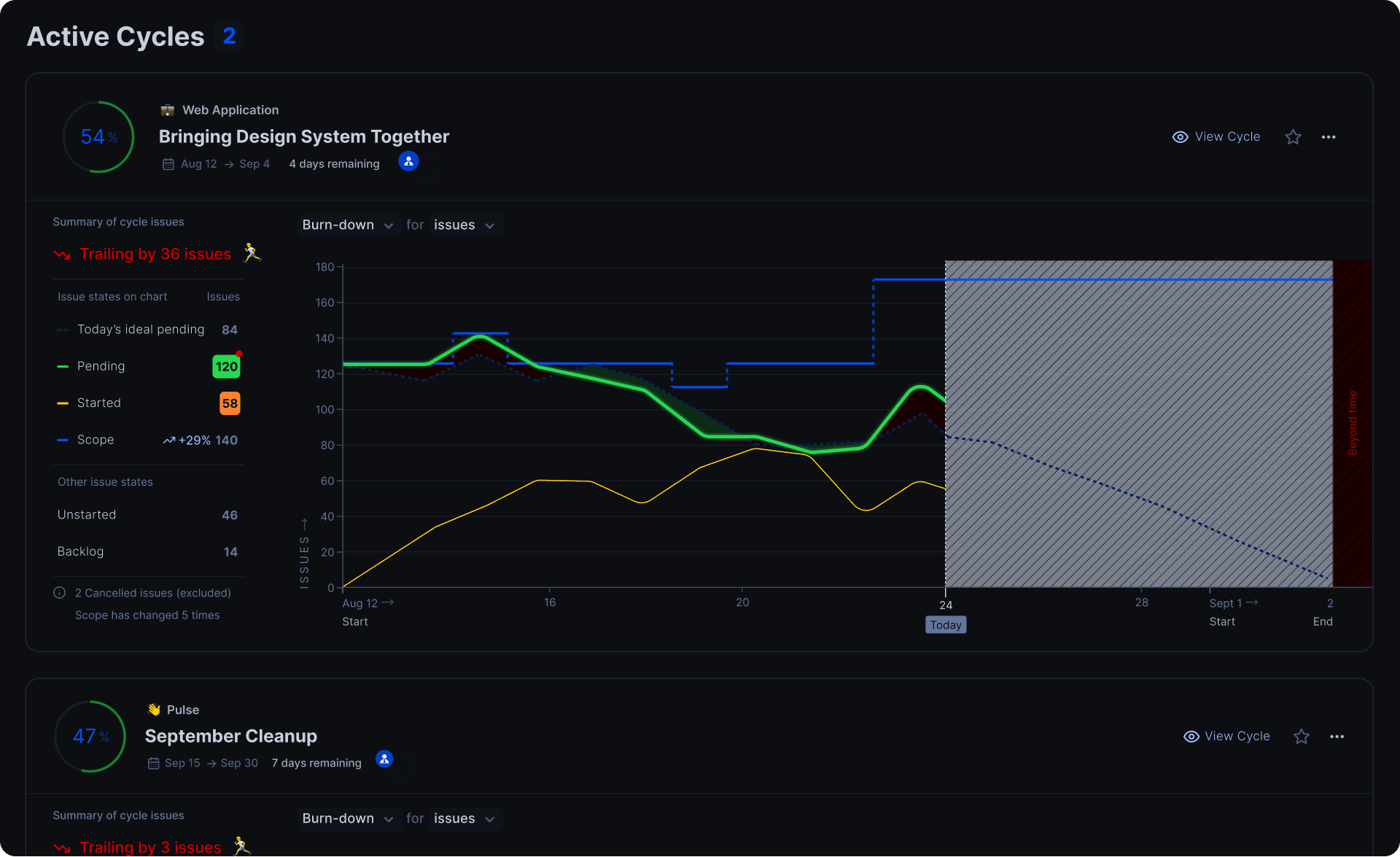
Designed Plane’s Active Cycles Dashboard to help teams visualize sprint health, identify risks, and track project momentum effortlessly.
Problem
A workspace would have multiple cycles running at a time across projects, they needed an effective way to track their progress over time all at once place.
The challenge was to design a dashboard that made it easy to monitor cycle health, spot bottlenecks, and take corrective actions all without overwhelming users with too much data.
What did I do
Designed the Active Cycles Dashboard for Plane’s project management system.
Focused on creating clear visualizations for:
Cycle progress (completed vs pending issues)
Burndown charts for time tracking
Issue status distribution within a cycle
Quick insights into overdue or blocked work
Prioritized readability and actionability — making sure users could instantly understand cycle health without needing a manual.
Introduced clean empty states and intuitive fallback behavior when data was missing.
Impact
Gave users a single source of truth for sprint and cycle tracking.
Improved team visibility into cycle progress, increasing proactive issue resolution.
Helped Plane differentiate its cycle management from more rigid sprint tools.
Webhooks
Designed the Webhooks Setup UX at Plane, making technical automation accessible, intuitive, and developer-friendly.
Problem
Plane needed a way for users — especially developers and technical teams — to set up webhooks easily for event-driven automation.
The challenge was designing an integration panel that handled complex backend actions but stayed simple and non-intimidating for users of varying technical expertise.
What did I do
Designed the Webhook Setup Interface to allow users to:
Select specific events they wanted to subscribe to (e.g., issue updates, comments).
Configure callback URLs and authentication settings.
Manage, edit, and delete webhook configurations securely.
Focused on creating step-by-step guidance, clean layouts, and error prevention mechanisms.
Designed thoughtful empty states and success messages to guide users through the setup journey smoothly.
Collaborated closely with backend engineers to align the UX with API capabilities.
Impact
Lowered the technical barrier for setting up webhooks inside Plane.
Enabled users to automate workflows and external integrations with minimal support.
Strengthened Plane’s positioning for developer adoption and enterprise readiness.


Empty states and Upgrade screens
Designed Plane’s Empty States and Upgrade Screens to drive user activation, feature discovery, and seamless freemium-to-premium transitions.
Problem
When users first interacted with Plane (especially on new features or limited free plans), they would often encounter "blank" spaces — no data, no context, no clear next step.
The challenge was to turn these quiet moments into opportunities for education, encouragement, and conversion — without feeling pushy or overwhelming.
What did I do
Designed Empty States across features to:
Educate users about the feature’s purpose.
Prompt meaningful first actions.
Crafted Upgrade Screens for freemium limitations, Highlighting the value of premium features
Positioned upgrades as a natural next step rather than an aggressive upsell.
Impact
Reduced user confusion and drop-offs in empty states.
Increased feature adoption rates by nudging users toward first actions.
Improved free-to-paid conversion experience without compromising trust or usability.

Signup Flow (Cloud and Self-Hosted)
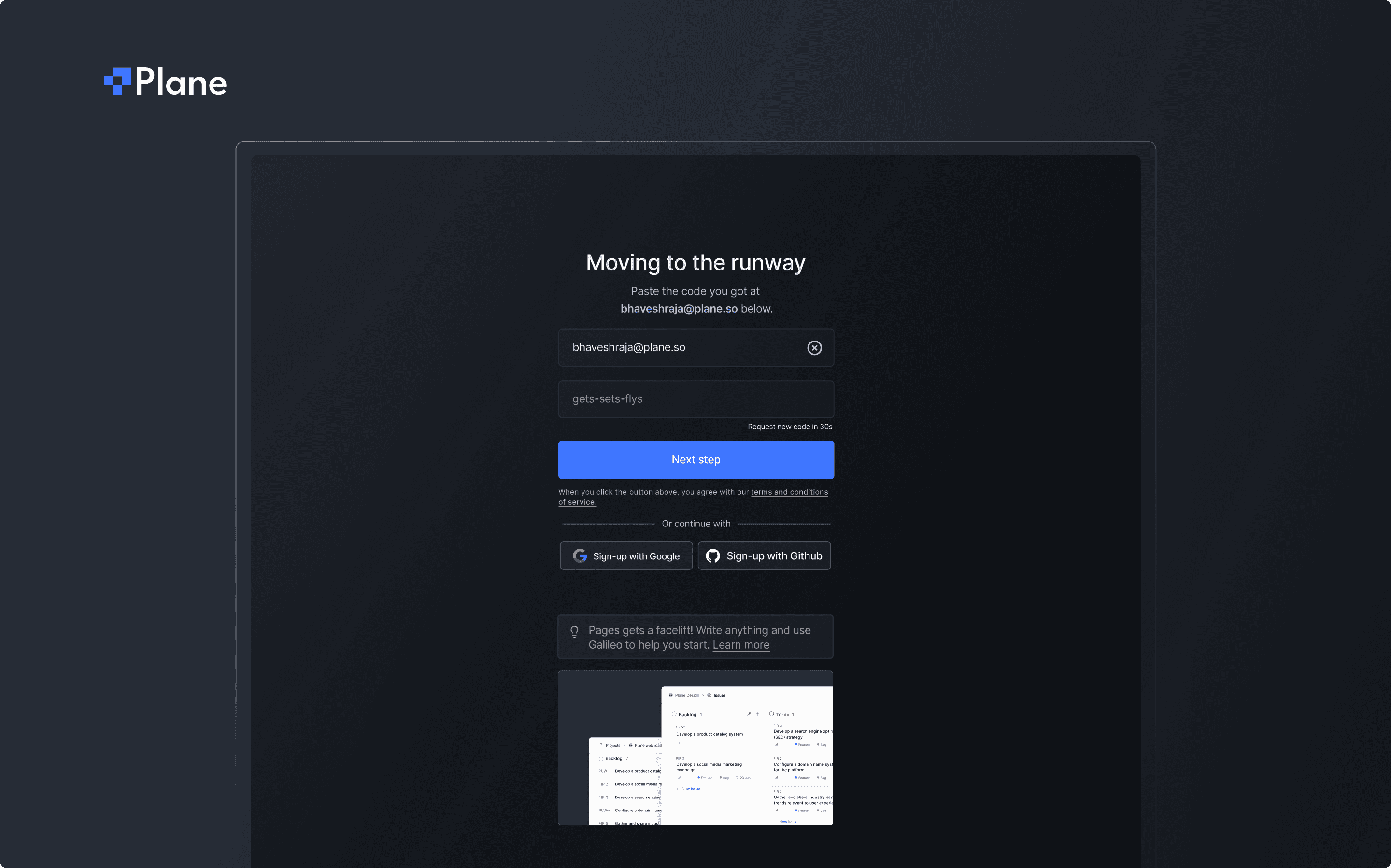
Designed Plane’s signup experience for cloud and self-hosted users — reducing friction, improving flexibility, and creating a smoother first-time experience.
Problem
Plane needed a frictionless signup experience for both cloud users and self-hosted users.
The challenge was to design an onboarding journey that felt effortless for casual users while offering the technical flexibility required by enterprise teams.
What did I do
Designed the end-to-end signup flow covering:
Cloud Hosted Signup
Self-Hosted Instance Signup
Key improvements included:
Email change during signup (rare but thoughtful edge-case UX).
Option to skip product tours and jump straight into the workspace.
Workspace creation flow post-signup.
Built UX for fallback scenarios:
Expired links
Invalid domains
Duplicate workspaces
For self-hosted instances, added:
Domain restrictions
Authentication controls
Impact
Reduced signup friction and improved completion rates.
Gave users more control and trust during their first interaction.
Created a consistent onboarding foundation for both hosted and self-hosted environments.
Email notifications
Designed a clean, granular email notification system to reduce noise and put users in control of how they stay informed.
Problem
Plane users needed email notification to stay updated and wanted control over the volume and types of email notifications they received. The challenge was to prevent notification fatigue while still ensuring that users received the updates that mattered to them without digging through complex settings.
What did I do
Designed a granular email notification settings panel, allowing users to:
Choose what events they receive emails for (e.g., assigned issues, mentions, status changes).
Adjust frequency (instant, daily digest, or off).
Manage preferences across different workspaces or roles.
Focused on:
Clarity — grouping settings in a way that made sense to both technical and non-technical users.
Simplicity — keeping the panel clean and non-overwhelming.
User control — always giving users a clear “off” or mute option.
Included empty states, confirmation toasts, and visual feedback for better interaction trust.
Impact
Reduced user complaints about email overload.
Increased engagement with meaningful notifications by letting users curate their preferences.
Strengthened Plane’s user experience by giving users control over communication, not just workflows.

Instance Admin Panel
Designed Plane’s Instance Admin Panel for self-hosted users — enabling secure, flexible, and intuitive configuration of authentication, sign-up rules, and integrations.
Problem
Plane offers a self-hosted version for companies running their own secure infrastructure.
The challenge was designing an admin interface that allows technical leads and ops teams to manage authentication, sign-up rules, and integrations — all without relying heavily on documentation or developer support.
What did I do
Designed the Instance Admin Panel for self-hosted deployments.
Focus areas included:
Authentication Configuration (OIDC, SAML, and email/password options)
Sign-Up Rules (restrict by domain, invite-only settings, disable sign-ups)
OpenAI Integration Controls (for AI-assisted features)
Library Management & Workspace Settings
Created a layout that supports progressive disclosure — showing advanced options only when needed.
Prioritized clarity, fail-safes, and error-handling states to prevent misconfiguration.
Worked closely with backend engineers to ensure seamless setup and live validation of configurations.
Impact
Enabled smoother onboarding for enterprise IT teams and DevOps engineers.
Reduced support requests by making setup intuitive and self-serve.
Elevated Plane’s readiness for adoption by privacy-focused teams and regulated industries.

Swimlanes, Drag and drop improvements
Designed modular Swimlanes, reworked Drag-and-Drop, and conceptualized Cross-Project Linking to enhance Plane’s Kanban usability and cross-team workflows.
Problem
Plane needed a way to help users visually segment and prioritize work in Kanban boards — without cluttering the UI.
Drag-and-drop also needed refinement to make prioritizing tasks feel fluid and intuitive, especially across swimlanes and modules.
What did I do
Designed modular swimlane views inside the Kanban board to:
Organize tasks by assignee, priority, or module.
Maintain clarity in large boards without overwhelming the user.
Built for flexibility — supporting dynamic swimlane definitions (e.g., priority levels, epics, status).
Impact
Made Kanban views more navigable and actionable, especially for large teams.
Reduced errors and misplacement with improved drag clarity.
Helped users focus on what matters most by making prioritization more visual.


Drag-and-Drop Revamp
Reworked initial drag-and-drop interactions to:
Make drop zones clearer and reduce user hesitation.
Improve visual feedback when moving tasks across swimlanes or modules.
Collaborated with devs to test micro-interactions and friction points.

Cross-Project Linking (Conceptual / Unshipped)
Designed the early prototypes for cross-project issue linking:
Search and reference issues from other projects.
View linked issue status, type, and owner in-context.
Visual distinction between local vs. external issues.
Permissions fallback when the user can’t access the other project.
Website Revamp
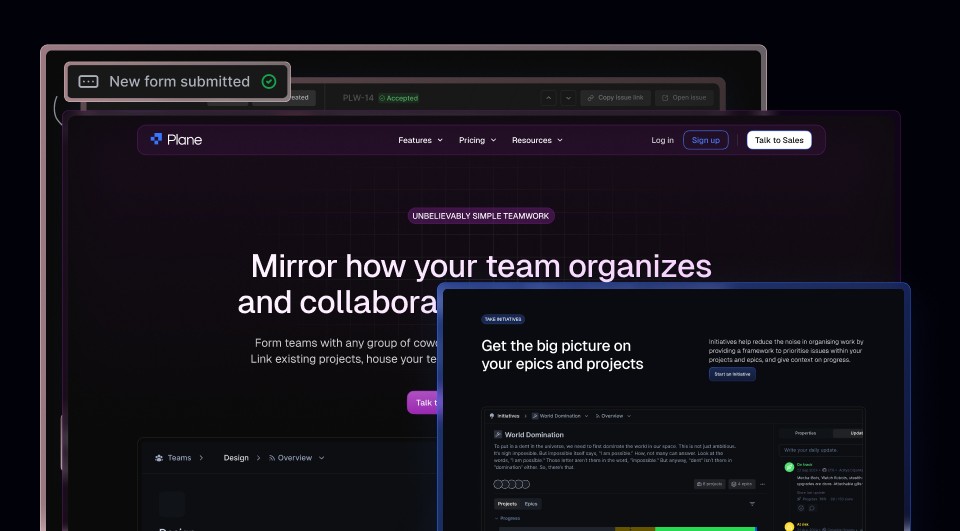
I owned Plane’s website revamp, balancing clean design, storytelling, and conversion-focused UX to align brand and product.
Problem
The original Plane.so website didn’t reflect the maturity, clarity, or personality of the product.
It lacked visual consistency, persuasive storytelling, and clear pathways for user conversion — especially for a tool competing in the crowded project management space.
What did I do
Handled the complete visual and UX redesign of Plane’s marketing website.
Key contributions included:
Homepage, Pricing Page, and Feature Overview Pages
UI/UX of the navigation system, optimized for new vs returning users
Mobile responsiveness and performance-friendly component design
Developed a style direction that reflected the product’s simplicity, transparency.
Impact
Improved brand perception with a clean, confident, and modern visual language.
Increased engagement and clarity around Plane’s positioning as both a product management tool and an open-source alternative.
Created a flexible design system that scaled across future marketing and product content.
Ending Statement
Working at Plane.so wasn’t just about designing features, it was about understanding how products evolve, how users think, and how design choices impact business, marketing, and engineering in equal measure.
From building core workflows to refining onboarding and helping to shape the public face of the brand, this journey helped me grow not just as a designer, but as a product thinker.